
THE ROOM EDIT
What’s off about my room?
Upload one photo of any room and get a short plan with numbered notes right on the photo. It starts with the changes that cost nothing, and if your room already works, it will tell you so.
 Reimagined · AI concept
THE PLAN FOR THIS ROOM · THREE NOTES, IN ORDER
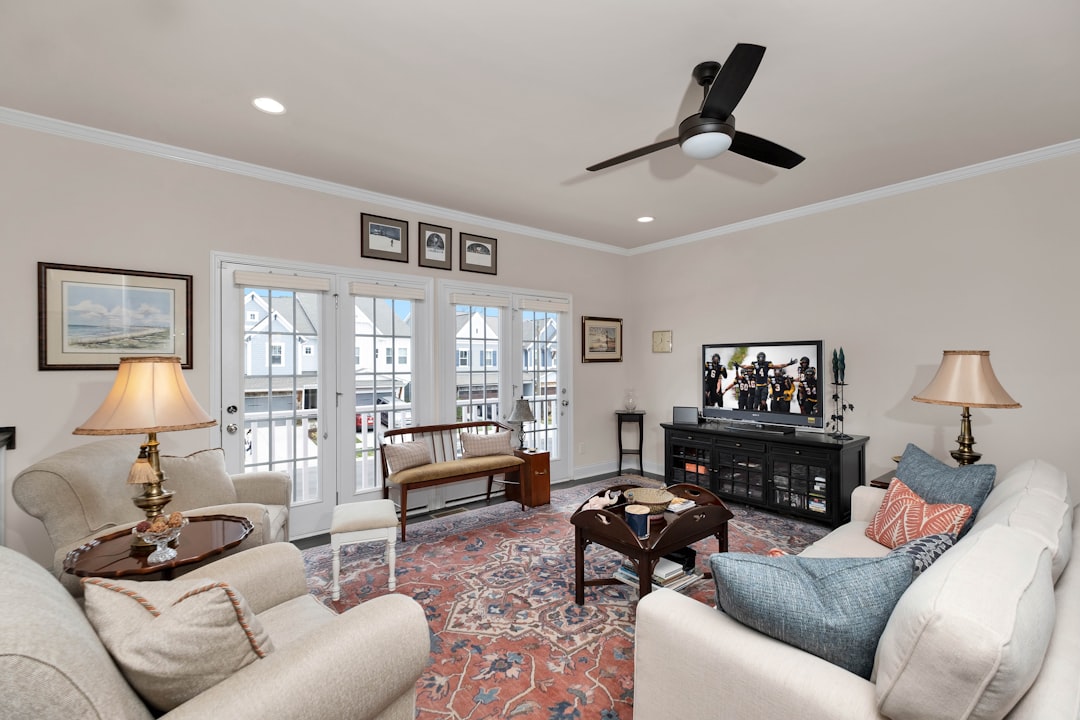
Drag the slider to see the direction the plan points, or tap a number on the photo.
The left side is a real room, photographed by Zac Gudakov / Unsplash. The right side is an AI-generated concept that illustrates where the plan leads; it isn’t a finished renovation. After your plan is ready, choose “Show me these changes” for a reimagined view of your own room. Your original photo stays unchanged.
YOUR ROOM PLAN
Your room, reimagined
See how the changes in your plan could look in your room.
Drag to compare, or use the arrow keys. AI visualization—details may vary from your actual room.
Decorating suggestions based on what’s visible. Measure before moving or buying furniture; colors can look different in person.
Only the advice is saved in this browser—not your photo.
HOW IT WORKS
- One photo, a few answers. Tell us what’s bugging you and what you’re willing to spend, including nothing.
- A short, ordered plan. Up to three changes, free moves first, each tied to something visible in your photo.
- Numbered notes on your photo. So you know exactly which chair, lamp, or rug we mean.
- See the changes. Choose “Show me these changes” to generate a before-and-after slider of your room.
- Come back with the next photo. Save the plan on your device, make a change, and upload the new view for round two.
WHAT IT WON’T DO
- It won’t invent problems. A room that works gets told so, with zero suggestions.
- The optional reimagined view is an AI visualization, not a photograph of completed work.
- It won’t recommend products, quote prices, or guess measurements. It asks you to measure.
- It won’t suggest anything structural or electrical, or anything that blocks a door or a heater.
- It won’t keep your photo. Only the written plan is saved, and only on your device, and only if you ask.
DIANE’S HOUSE RULES
The rules this tool follows are hers.
“When I go into somebody’s home, I sit there and think of ways to change it. If I go into a hotel room, I like to change it. It’s something in my mind that I can’t stop.”
“I like bright. Natural light is a must. My mood changes when I’m in a dark space.”
“Lighting is so key to any successful ambience of a place.”
“You have to be happy in your space.”
That’s why the plan starts with light and walkways before it ever suggests buying anything, and why it respects the pieces you tell us are staying. More from Diane in The One-Weekend Room Rescue and Home Ideas.
QUESTIONS
What happens to my photo?
It’s resized in your browser, checked by our server, and passed to OpenAI for analysis. If you choose “Show me these changes,” the photo is sent again to create the edited preview. We don’t store it or add it to our media library. If you save your plan, only the text is saved, and only on your own device.
Why only three suggestions?
Because a list of twelve is a to-do list, not a plan. Three changes in order is something you can actually do this weekend. And if the room already works, you may get none.
Which rooms does it work for?
Any room: living rooms, bedrooms, kitchens, dining rooms, bathrooms, entries, home offices, and patios. In kitchens and baths the plan sticks to what you can move, clear, or add without tools; it won’t suggest plumbing or tile work.
Is there a limit?
Yes. Each visitor can run a few analyses an hour, and the site has a daily cap while we’re getting started. If you hit it, come back tomorrow.